Tuesday, 29 November 2011

DFU mode for beginners

What is DFU mode?
Device Firmware Update (DFU) mode is a special failsafe mode which Apple has built into all of their devices so that they can restored to a stock iOS firmware regardless of the state they may be in. It is implemented at a lower level than the normal recovery mode, which shows the "connect to iTunes cable" graphic on the screen of the iPhone. DFU mode by contrast has a completely blank screen so there is no way to tell you are in DFU mode by looking at the device.

What's the difference between DFU and normal recovery mode?
When your iPhone is in normal recovery mode you will see a graphic like this...
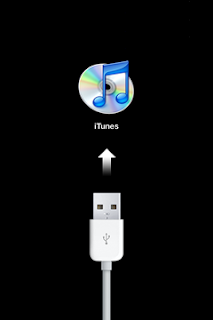

(remember, if you see this picture you are NOT in DFU mode)

List of Siri Commands


new line move to the next line (like pressing “Return” on a keyboard)
new paragraph to start a new paragraph
all caps to make the next word all uppercaseFor example, saying:

I am hungry feed me all caps now please

produces the text:

I am hungry feed me NOW please
all caps on … all caps off to make part of what you say uppercaseFor example, saying:

I am hungry all caps on feed me now all caps off please

produces the text:

I am hungry FEED ME NOW please
no caps to make the next word lowercaseFor example, saying:

I like no caps Mike

produces the text:

I like mike
no caps on … no caps off to make sure part of what you say is all lowercaseFor example, saying:

Our friends no caps on Steve and Tina no caps off live in California

produces the text:

Our friends steve and tina live in California
space bar to prevent a hyphen from appearing in a normally hyphenated wordFor example, saying:

This restaurant is first space bar class

prevents first-class from being hyphenated, and produces the text:

This restaurant is first class

Monday, 28 November 2011

Free online harddisk / filesharing - Dropbox


Sign up free 2GB dropbox account now. Always have your stuff when you need it with @Dropbox. 2GB account is free!

Your files, anywhere

Any file you save to Dropbox also instantly saves to your computers, phones, and the Dropbox website.

  • 2GB of Dropbox for free, with subscriptions up to 100GB available.
  • Your files are always available from the secure Dropbox website.
  • Dropbox works with Windows, Mac, Linux, iPad, iPhone, Android and BlackBerry.
  • Works even when offline. You always have your files, whether or not you have a connection.
  • Dropbox transfers just the parts of a file that change (not the whole thing).
  • Manually set bandwidth limits -- Dropbox won't hog your connection.

iOS 5.0.1 Jailbreak tutorial


The latest version of Redsn0w, which is 0.9.9b8, can tether jailbreaking the iOS 5.0.1. However, before proceeding, there are a few points users must be aware of.

In a recent tweet, iOS hacker @pod2g warned users saying that those still waiting for an untethered jailbreak for iOS 5, should not upgrade to iOS 5.0.1.

"Note about 5.0.1: don't update if you plan on jbking : the bug Charlie MILLER found can simplify exploits dramatically and will be closed," he tweeted.

According to reports, no method has been figured out yet to downgrade to iOS 5. Hence, if you upgrade to iOS 5.0.1, you might lose the chance of a potentially untethered jailbreak for iOS 5.

For those who already have iOS 5.0.1 running on their devices and wish to jailbreak iOS 5.0.1, here are the steps:

Install Siri Dictation On iPhone 4, iPhone 3GS And iPod touch 4G Using Siri0us


Great news for iPhone 4 users who have been waiting to get Siri on their devices; while hackers have been working a lot to port Siri on iPhone 4, some could now make Siri dictation available for free for iPhone 4 and iPhone 3GS users. Siri dictation is a part from the full Siri part. Let’s have small how to guide below.
Siri on iPhone 4 has already been fully ported and we’ve seen it also on iPod touch 4G and iPhone 3GS. The port will not be released until an iPhone 4S is released to the public. Today, developer Eric Day developed a jailbreak tweak which brings Siri’s “dictation” on your iPhone 4 and iPhone 3GS.


Saturday, 19 November 2011

PayPal Launches Facebook App for Sending Money to Friends

PayPal has integrated with Facebook to launch a new app that allows people to send money with the click of a button via PayPal accounts. The name of the app is "Send Money”. This is a great app for the people who want to wish and present monetary gifts to their loved ones on their birthdays and other events.
Now in addition to Ecards sharing on walls and simply wishing people they can easily send monetary gifts through this new app. This will surely increase the number of hours people spend on Facebook.


Friday, 18 November 2011

The Lost Steve Jobs Interview Was Recovered

Robert Cringely, employee number 12 at Apple and host of "Triumph of the Nerds", reveals how he recovered the lost interview with Steve Jobs.

"This is from my documentary series called 'Triumph of the Nerds' made in 1995. We interviewed 125 Silicon Valley luminaries including Steve Jobs for that three hour series which has been seen in sixty countries. We only used nine minutes out of the sixty nine minute Jobs interview and then all of the master tapes were lost. Until, Steve Jobs died on October 5th and the director said, 'I think I kept a copy of that Jobs interview. Let's go look for it' - in his garage."

Take a look below ...

[via BusinessInsider]